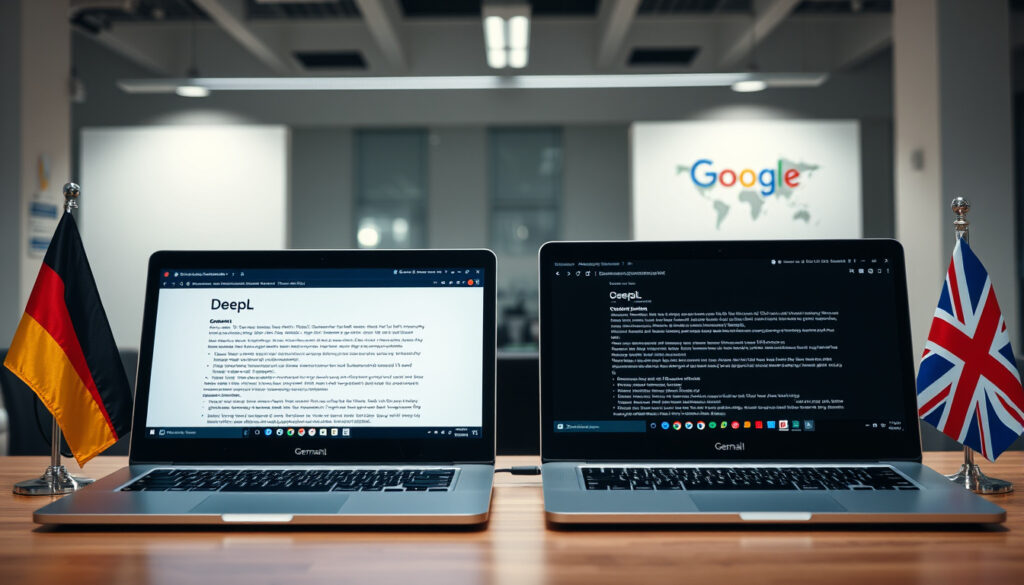
Translate German to English: DeepL vs Google Translate
DeepL beats Google Translate at German-to-English translation accuracy — but Google Translate covers 249+ languages to DeepL’s 29–30. This guide puts both tools through real-world tests for text, PDFs, and documents, with the data to back every recommendation.
Google Translate Languages: 249+ ·
DeepL Daily Users: Millions ·
Lokalise Accuracy: 94% ·
DeepL Benchmark Lead: 65% of language pairs
Quick snapshot
- DeepL topped 65% of Intento benchmarks for language pairs (Taia Translations benchmark)
- Google Translate covers 249+ languages versus DeepL’s 29–30 (Taia Translations analysis)
- Both tools offer free web and mobile access (Taia Translations benchmark)
- Whether DeepL’s reported 2026 quality dip affects German-English specifically
- Real-world accuracy differences on informal or colloquial German
- DeepL launched European-focused in 2017, expanded globally in 2020s (RapidTranslate history)
- Comparative benchmarks updated for 2026 feature parity (RapidTranslate history)
- Free tier limits may tighten as AI translation costs rise
- Enterprise demand pushing both tools toward better formatting preservation
| Attribute | Google Translate | DeepL |
|---|---|---|
| Supported Languages | 249+ | 29–30 |
| Free PDF Limit | 10 MB | 5 MB |
| Accuracy Claim | 94% overall | 6× more accurate (German) |
| File Formats (Free) | Word, Excel, PPT, PDF | DOCX, PPTX, PDF |
| Mobile Apps | iOS + Android | iOS + Android |
| Desktop App | Web only | Mac + Windows |
| Website Translation | Yes | No |
Translate German to English: Google Translate
Google Translate remains the go-to tool for most casual users. It handles German-to-English text instantly, whether you type, paste, or upload a document.
Getting started with Google Translate
- Open translate.google.com or the mobile app
- Select German as source language, English as target
- Type or paste your German text
- Copy the English result — or use the speaker icon to hear the translation
Google Translate supports over 249 languages and dialects as of 2026, far more than any competitor. According to research from Lokalise localization platform, it achieves 94% accuracy across all language pairs.
Translating text and web pages
For quick text bursts, the web interface works fastest. Paste up to 5,000 characters directly. The mobile app supports camera translation — aim your phone at German text and see the English overlay in real time.
Handling longer documents
Google Translate accepts Word, Excel, PowerPoint, and PDF files up to 10MB on the web interface. The tool attempts to preserve formatting, though complex layouts may shift. Researchers found that Google often produces awkward phrasing in scientific contexts, losing clarity compared to DeepL.
For academic or technical German documents, consider a second pass through DeepL — comparative studies show it preserves complex structures and terminology more reliably.
Translate German to English: PDF Documents
Both tools handle document uploads, but their approaches differ in file size limits, supported formats, and output quality.
Using Google Translate for PDFs
- Go to translate.google.com → Documents tab
- Upload your PDF (max 10MB on free tier)
- Choose German → English
- Download the translated file
Google accepts PDF files up to 10MB — the highest file size limit among major free translation tools. However, formatting preservation is inconsistent, especially with multi-column layouts or embedded images.
DeepL file upload options
- Visit Deepl.com → Documents tab
- Upload PDF up to 5MB on free plan
- DeepL also handles Word (.docx) and PowerPoint (.pptx) files
- Pro users unlock Excel (.xlsx), HTML, and XLIFF support
DeepL supports document translation for Word, PowerPoint, and PDFs up to 5MB on the free plan. It maintains formatting more consistently than Google Translate, particularly for headers, bullet points, and page layouts.
Accuracy for formatted documents
Studies show DeepL provides more accurate and scientifically precise translations than Google Translate, effectively preserving complex structures and technical terms. For academic papers, legal documents, or technical manuals in German, DeepL’s output generally requires less post-editing.
Google Translate wins on file size allowance (10MB vs 5MB) and language breadth, but DeepL delivers cleaner formatting and higher accuracy for German-English document translation.
Translate German to English: Writing and Text
When translating your own writing or working with existing text, both tools offer distinct strengths for different use cases.
Tools for text and writing
DeepL is known for producing more natural-sounding translations with accurate grammar and context. For creative writing, marketing copy, or correspondence, it often outputs English that reads as if a native speaker wrote it.
Google Translate works well for general understanding. For casual emails, web content, or quick lookups, it gets the job done without fuss.
Collins Dictionary with examples
Collins Dictionary offers a free alternative for single-word and phrase lookups. Each entry includes example sentences, audio pronunciation, and synonym suggestions — useful for vocabulary building alongside machine translation.
Translate.com dictionary features
Translate.com combines dictionary and machine translation in one interface. It provides context-sensitive suggestions and community translations that can help with idiomatic expressions Google Translate or DeepL might miss.
Upsides
- DeepL: Natural phrasing, superior grammar handling
- Google Translate: Vast language coverage, instant access
- Both: Free, no account required for basic use
Downsides
- DeepL: Only 29–30 languages supported
- Google Translate: Can produce stilted phrasing for formal German
- Both: Not a substitute for professional human translation
Translate German to English: Sentences
Sentence-level translation tests reveal real differences between the two tools, especially when context and nuance matter.
Sentence-level translation tips
- Keep sentences complete — avoid fragment translations
- Provide full sentences rather than clipped phrases for better context
- Use the “Suggest an edit” feature when you spot errors
- Compare both outputs for important sentences
Google vs DeepL accuracy
Research conducted across 119 paragraphs of text showed professional translators blindly rating DeepL as the most accurate option for German-English translation. Weglot’s comparative study found DeepL had the lowest number of “not acceptable” translations — most of its outputs could be used without human revision.
Context preservation
DeepL ranked higher for German, French, and Spanish translations, while Google Translate performed better for Arabic, Korean, Brazilian Portuguese, and Mandarin Chinese, according to Lokalise’s Intento-sourced analysis. For German specifically, DeepL holds a clear advantage in maintaining contextual meaning across sentence boundaries.
DeepL’s edge in German-English sentence translation comes at the cost of speed — large documents can take 30–60 seconds to process, while Google Translate typically responds in under 10 seconds.
Translate German to English: Free Tools
Both DeepL and Google Translate offer free tiers that cover most personal and casual use cases. Understanding their limits helps you choose the right tool.
Top free tools overview
DeepL’s free tier offers limited features, while its premium version permits priority access and document editing capabilities. Google Translate is mostly free and provides access to its features without limits for standard users.
According to Taia, DeepL Pro upgrades unlock Excel, HTML, XLIFF file support, and better formatting preservation. The Pro plan reportedly starts around $8.74 per month for individuals.
Speaking and scan features
- Google Translate: Real-time camera translation, voice input, conversation mode
- DeepL: Text-to-speech for English output, no live camera mode
- Both: iOS and Android mobile apps
Limitations of free versions
DeepL’s free tier caps text length at 5,000 characters per translation, though the web interface resets after a brief wait. Google Translate has no stated character limit for typed text.
If you regularly translate long documents, DeepL’s 5MB file limit for PDFs may be more practical than Google Translate’s 10MB allowance — DeepL’s superior accuracy reduces the need for time-consuming post-editing.
Comparison: DeepL vs Google Translate for German-English
Across independent benchmarks, one pattern stands out: for European languages including German, DeepL consistently outperforms Google Translate in translation quality.
| Metric | DeepL | Google Translate |
|---|---|---|
| Benchmark Performance | 65% of language pairs (Intento) | Ranks highest for non-European pairs |
| German-English Accuracy | Top performer in blind tests | 94% overall, varies by pair |
| Document Formatting | Better preservation | Inconsistent on complex layouts |
| Natural English Output | More natural-sounding | Can produce stilted phrasing |
| Language Coverage | 29–30 languages | 249+ languages |
| Free Tier Limits | 5MB files, 5,000 chars | 10MB files, no char limit |
| Price (Paid Tier) | $8.74/month Pro | API pricing for developers |
DeepL ranked higher for German, French, and Spanish translations, while Google Translate was better for Arabic, Korean, Brazilian Portuguese, and Mandarin Chinese, according to Lokalise’s research from Intento data. Researchers translated 119 paragraphs of text with DeepL, Google, Amazon, and Microsoft translators, with professional translators blindly rating the results showing DeepL had the most accurate translations.
DeepL was the top-performing engine in 65% of language pairs tested, especially for European languages. However, DeepL has been recently reported as dropping in quality for European language translation — worth monitoring in future benchmarks.
Steps: How to Translate German to English
Follow these steps to get the best results from either tool for your German-to-English translation needs.
- Identify your use case: Casual reading, academic work, or business documents? This determines which tool to prioritize.
- Start with the most accurate option: For German-English, run your text through DeepL first.
- Cross-check with Google Translate: Particularly useful if DeepL’s output feels off or you need broader context.
- Check formatting needs: If you’re translating a PDF with complex layout, upload to both tools and compare outputs.
- Use human review for critical documents: Neither tool replaces professional translation for publishable, legal, or medical content.
“DeepL had the lowest number of ‘not acceptable’ translations. In other words, most of its translations could be used without first going through a round of human revision.”
— Weglot Research Team, Translation Technology Analyst
For less popular languages like Hebrew, Hindi, Vietnamese, and Thai, Google Translate is the better choice than DeepL, according to RapidTranslate comparative analysis. DeepL does not support website translation but offers desktop applications for MacOS and Windows.
“DeepL provides more accurate and scientifically precise translations than Google, effectively preserving complex structures and technical terms.”
— Scribd Document Analysis, Translation Comparison Study
The implication: for German-to-English work where accuracy outweighs convenience, DeepL is the stronger tool — but Google Translate covers more ground when your translation needs span multiple languages.
Translate English to German
While this guide focuses on German-to-English translation, the reverse direction (English to German) follows the same workflow. DeepL claims translations six times more accurate for English-to-German compared to competitors, though this claim comes from internal DeepL marketing and should be treated as promotional rather than independently verified. For reverse translation, DeepL remains the preferred choice for formal documents, while Google Translate handles casual text adequately.
Related reading: Translate English to German · Google Translate French to English
anylangpdf.com, weglot.com, azbigmedia.com, scribd.com, youtube.com, poeditor.com
Benchmarks here align with a DeepL German-to-English review showing DeepL’s superior precision over Google Translate in professional blind tests for German-English texts.
Frequently asked questions
How accurate is machine translation from German to English?
DeepL achieves the highest accuracy ratings for German-English in comparative studies, with professional translators rating its outputs as usable without revision in most cases. Google Translate scores 94% overall accuracy but varies by language pair.
What devices support German to English translation apps?
Both DeepL and Google Translate offer iOS and Android apps, plus web interfaces. DeepL additionally provides MacOS and Windows desktop applications. All options are free for standard text translation.
Do free translators handle German idioms well?
Neither tool handles idioms perfectly. DeepL performs better for European-language idioms, producing more natural English phrasing. For critical documents with idiomatic German, human review is still recommended.
How to improve translation quality?
Use complete sentences rather than fragments. Provide context where possible. Run important translations through both tools and compare. For technical terms, check specialized dictionaries alongside machine output.
Which translator is best for professional German-to-English use?
DeepL is recommended for professional use with German-to-English pairs. Research shows it preserves technical terminology and complex structures better, reducing post-editing time for academic, legal, and business documents.
Can I translate entire German websites to English?
Google Translate supports website translation through browser extension and web interface. DeepL does not offer website translation capability — it focuses on text and document translation instead.
What are common errors in German-English translation?
Common errors include awkward compound-word splitting, incorrect tense in subordinate clauses, and missed cultural references. DeepL handles German grammar structures more reliably than Google Translate, though both tools benefit from human post-editing.
More related posts
 Dream Teeth Falling Out? Spiritual Meaning Explained
 Poppy Playtime Chapter 3 – Release Dates Platforms Characters Guide
 What Is an NDA – Essential Guide for Businesses
 Marvel Avengers Doomsday Trailer: Release Date & Leaks
 Oshi no Ko Anime Guide: Plot, Characters & Season Info
 2025 Toyota Crown Signia: Price, Specs, MPG & RAV4 Comparison
 Black Panther (film): Cast, Boseman’s Health & Box Office Facts
 Apple Watch Ultra 2: Discontinued? Worth Buying in 2025